> ## Documentation Index
> Fetch the complete documentation index at: https://sequence-0fb8d9e6-api_docs.mintlify.site/llms.txt
> Use this file to discover all available pages before exploring further.
> Learn how to get started with Ecosystem Wallet Web SDK
# Getting started
First make sure you have created a Sequence Project account, if you don't have one, you can create one [here](https://sequence.build/), you will need your `Project Access Key` in order to continue.
Our Web SDKs are built on top of wagmi, so for advanced configurations, sending
transactions, calling contracts, etc., please refer to the [wagmi
documentation](https://wagmi.sh/react/WagmiConfig).
```bash theme={null}
npm install @0xsequence/connect@v6-beta wagmi viem
# or
pnpm install @0xsequence/connect@v6-beta wagmi viem
# or
yarn add @0xsequence/connect@v6-beta wagmi viem
```
Next, create the Ecosystem Wallet configuration.
**Required for Ecosystem Wallet**
* `projectAccessKey`
* `walletUrl`
**Optional**
* `dappOrigin`
* `signIn.projectName`, `appName`
* `chainIds`, `defaultChainId`
* `explicitSessionParams` (optional; `nativeTokenSpending` defaults to `valueLimit: 0`)
* `includeFeeOptionPermissions`, `enableImplicitSession`
* `nodesUrl`, `relayerUrl`
* `walletConnect`
```typescript [config.ts] theme={null}
import { createConfig } from "@0xsequence/connect";
export const config: any = createConfig({
projectAccessKey: "AQAAAAAAAABtDHG1It7lxRF_9bbxw4diip8",
walletUrl: 'https://next-acme-wallet.sequence-dev.app',
// Optional
dappOrigin: window.location.origin,
signIn: {
projectName: 'Sequence Web SDK Demo'
},
appName: 'Sequence Web SDK Demo',
chainIds: [42161],
defaultChainId: 42161,
google: true,
apple: true,
email: true,
explicitSessionParams: { ... }
});
```
The `walletUrl` is the URL of the Ecosystem Wallet your dApp will use, for our demo, we are using the [Acme Ecosystem Wallet](https://next-acme-wallet.sequence-dev.app).
The `dappOrigin` is the origin of your dapp, used to verify where the user is coming from.
The `explicitSessionParams` object allows your dapp to request specific permissions from the user upon connection.
These permissions can authorize your dapp to perform certain actions on the user's behalf for a defined period, creating a more seamless user experience with no transaction prompts or allowing automations.
`nativeTokenSpending` is optional. If omitted, the session will default to a native token `valueLimit` of `0`.
For example, let's create an explicit session that allows your dapp to `deposit 100 USDC into the AAVE V3 pool on Arbitrum, on behalf of the user for the next 24 hours`
```typescript [config.ts] theme={null}
import { createConfig, createContractPermission } from "@0xsequence/connect";
import { parseEther, parseUnits } from "viem";
export const USDC_ADDRESS_ARBITRUM = '0xaf88d065e77c8cC2239327C5EDb3A432268e5831'
export const AAVE_V3_POOL_ADDRESS_ARBITRUM = '0x794a61358D6845594F94dc1DB02A252b5b4814aD'
export const config: any = createConfig({
projectAccessKey: "AQAAAAAAAABtDHG1It7lxRF_9bbxw4diip8",
walletUrl: 'https://next-acme-wallet.sequence-dev.app',
// Optional
dappOrigin: window.location.origin,
signIn: {
projectName: 'Sequence Web SDK Demo',
},
appName: 'Sequence Web SDK Demo',
chainIds: [42161],
defaultChainId: 42161,
google: true,
apple: true,
email: true,
explicitSessionParams: {
chainId: 42161,
nativeTokenSpending: {
valueLimit: parseEther('0.01'), // Allow spending up to 0.01 ETH for gas fees
},
expiresIn: {
hours: 24, // Session lasts for 24 hours
},
permissions: [
createContractPermission({
address: AAVE_V3_POOL_ADDRESS_ARBITRUM,
functionSignature: 'function supply(address asset, uint256 amount, address onBehalfOf, uint16 referralCode)',
rules: [
{
param: 'asset',
type: 'address',
condition: 'EQUAL',
value: USDC_ADDRESS_ARBITRUM
},
{
param: 'amount',
type: 'uint256',
condition: 'LESS_THAN_OR_EQUAL',
value: parseUnits('100', 6), // Max cumulative amount of 100 USDC
cumulative: true
}
]
})
]
}
});
```
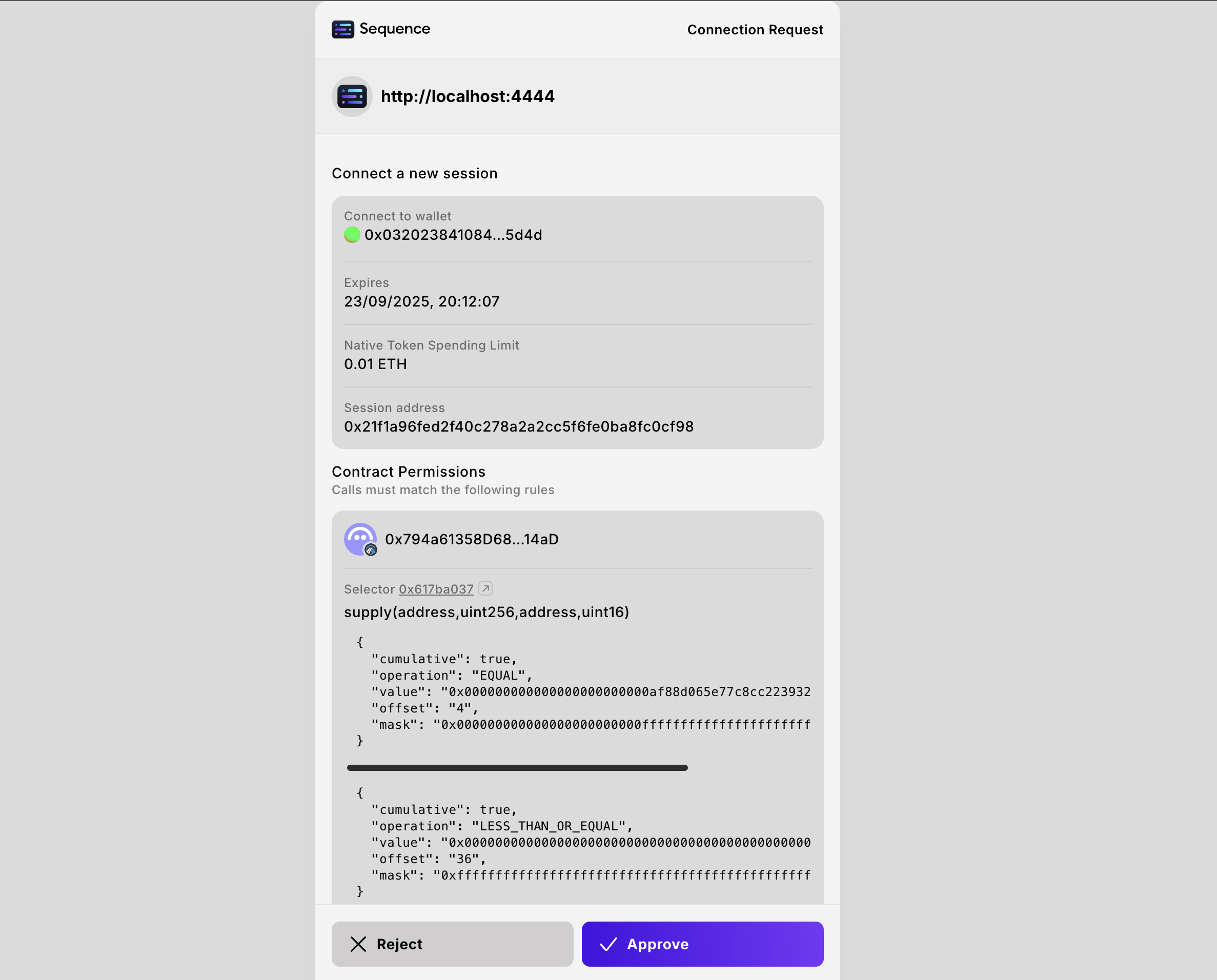
When a user connects their wallet, they will be prompted to grant permissions to the dApp. Once approved,
actions like supplying USDC to AAVE can be executed without requiring additional pop-ups, and can even be automated while the user is offline.
Wrap your application with the `SequenceConnect` Provider to enable the use of the package’s hooks and components throughout your application.
The configuration we created in [step 2](/sdk/web/wallet-sdk/ecosystem/getting-started#create-a-config) needs to be passed into the `config` of the provider.
```typescript [main.tsx] theme={null}
import React from "react";
import ReactDOM from "react-dom/client";
import "./index.css";
import App from "./App";
import { config } from "./config";
import { SequenceConnect } from "@0xsequence/connect";
function Dapp() {
return (
);
}
ReactDOM.createRoot(document.getElementById("root")!).render(
);
export default Dapp
```
```typescript [App.tsx] theme={null}
import './App.css'
import { useOpenConnectModal } from '@0xsequence/connect'
function App() {
const {setOpenConnectModal} = useOpenConnectModal()
return (
<>
)
}
export default App
```
The user will be prompted to approve the permissions when connecting.
```bash theme={null}
npm install @0xsequence/connect@v6-beta wagmi viem
# or
pnpm install @0xsequence/connect@v6-beta wagmi viem
# or
yarn add @0xsequence/connect@v6-beta wagmi viem
```
Next, create the Ecosystem Wallet configuration.
**Required for Ecosystem Wallet**
* `projectAccessKey`
* `walletUrl`
**Optional**
* `dappOrigin`
* `signIn.projectName`, `appName`
* `chainIds`, `defaultChainId`
* `explicitSessionParams` (optional; `nativeTokenSpending` defaults to `valueLimit: 0`)
* `includeFeeOptionPermissions`, `enableImplicitSession`
* `nodesUrl`, `relayerUrl`
* `walletConnect`
```typescript [config.ts] theme={null}
import { createConfig } from "@0xsequence/connect";
export const config: any = createConfig({
projectAccessKey: "AQAAAAAAAABtDHG1It7lxRF_9bbxw4diip8",
signIn: {
projectName: 'Sequence Web SDK Demo',
},
walletUrl: 'https://next-acme-wallet.sequence-dev.app',
dappOrigin: window.location.origin,
appName: 'Sequence Web SDK Demo',
chainIds: [42161],
defaultChainId: 42161,
google: true,
apple: true,
email: true,
explicitSessionParams: { ... }
});
```
The `walletUrl` is the URL of the Ecosystem Wallet you dApp will use, for our demo, we are using the [Acme Ecosystem Wallet](https://next-acme-wallet.sequence-dev.app).
The `dappOrigin` is the origin of your dapp, used to verify where the user is coming from.
The `explicitSessionParams` object allows your dapp to request specific permissions from the user upon connection.
These permissions can authorize your dapp to perform certain actions on the user's behalf for a defined period, creating a more seamless user experience with no transaction prompts.
`nativeTokenSpending` is optional. If omitted, the session will default to a native token `valueLimit` of `0`.
For example, let's create an explicit session that allows your dapp to `deposit 100 USDC into the AAVE V3 pool on Arbitrum, on behalf of the user for the next 24 hours`
```typescript [config.ts] theme={null}
import { createConfig, createContractPermission } from "@0xsequence/connect";
import { parseEther, parseUnits } from "viem";
export const USDC_ADDRESS_ARBITRUM = '0xaf88d065e77c8cC2239327C5EDb3A432268e5831'
export const AAVE_V3_POOL_ADDRESS_ARBITRUM = '0x794a61358D6845594F94dc1DB02A252b5b4814aD'
export const config: any = createConfig({
projectAccessKey: "AQAAAAAAAABtDHG1It7lxRF_9bbxw4diip8",
signIn: {
projectName: 'Sequence Web SDK Demo',
},
walletUrl: 'https://next-acme-wallet.sequence-dev.app',
dappOrigin: window.location.origin,
appName: 'Sequence Web SDK Demo',
chainIds: [42161],
defaultChainId: 42161,
google: true,
apple: true,
email: true,
explicitSessionParams: {
chainId: 42161,
nativeTokenSpending: {
valueLimit: parseEther('0.01'), // Allow spending up to 0.01 ETH for gas fees
},
expiresIn: {
hours: 24, // Session lasts for 24 hours
},
permissions: [
createContractPermission({
address: AAVE_V3_POOL_ADDRESS_ARBITRUM,
functionSignature: 'function supply(address asset, uint256 amount, address onBehalfOf, uint16 referralCode)',
rules: [
{
param: 'asset',
type: 'address',
condition: 'EQUAL',
value: USDC_ADDRESS_ARBITRUM
},
{
param: 'amount',
type: 'uint256',
condition: 'LESS_THAN_OR_EQUAL',
value: parseUnits('100', 6), // Max cumulative amount of 100 USDC
cumulative: true
}
]
})
]
}
});
```
When a user connects their wallet, they will be prompted to grant permissions to the dApp. Once approved,
actions like supplying USDC to AAVE can be executed without requiring additional pop-ups, and can even be automated while the user is offline.
Wrap your application with the `SequenceConnect` Provider to enable the use of the package’s hooks and components throughout your application.
The configuration we created in [step 2](/sdk/web/wallet-sdk/ecosystem/getting-started#create-a-config) needs to be passed into the `config` of the provider.
```typescript [src/app/providers.tsx] theme={null}
"use client";
import React from "react"
import { config } from "./config"
import { SequenceConnect } from "@0xsequence/connect"
const Providers = ({ children }: { children: React.ReactNode }) => {
return (
{children}
)
}
export default Providers;
```
Wrap your app in the Providers component.
```typescript [src/app/layout.tsx] theme={null}
import type { Metadata } from "next";
import { Geist, Geist_Mono } from "next/font/google";
import "./globals.css";
import Providers from "./providers";
const geistSans = Geist({
variable: "--font-geist-sans",
subsets: ["latin"],
});
const geistMono = Geist_Mono({
variable: "--font-geist-mono",
subsets: ["latin"],
});
export const metadata: Metadata = {
title: "Create Next App",
description: "Generated by create next app",
};
export default function RootLayout({
children,
}: Readonly<{
children: React.ReactNode;
}>) {
return (
{children}
);
}
```
```typescript [App.tsx] theme={null}
"use client"
import { useOpenConnectModal } from '@0xsequence/connect'
function Home() {
const { setOpenConnectModal } = useOpenConnectModal()
return (
<>
)
}
export default Home
```
The user will be prompted to approve the permissions when connecting.